# Dawson Robotics Hackathon 2026
The Dawson Robotics Hackathon is a beginner-friendly team challenge using the Raspberry Pi Pico 2 and a small robot kit. Teams will build, test, and program a robot in Python.
No prior robotics experience is required. The event is designed so beginners can complete a meaningful path, while experienced teams can push toward the full navigation challenge.
# Schedule
| Item | Date / time |
|---|---|
| Prep workshop | Wednesday, May 6, 2026, 4:00 PM in room 7A.5 or 7A.2 |
| Practice course | Tuesday, May 5 through Thursday, May 7, 2026, room/times to be confirmed |
| Challenge day | Friday, May 8, 2026, 3:00 PM-7:00 PM |
Bring a laptop if you can.
# The Challenge
Your robot will complete a navigation course using a state machine. A state machine is a program that moves through named modes based on sensor events.
The challenge flow is:
- Start from the start box.
- Follow a line using the line-tracking sensor.
- Detect an obstacle or gate with the ultrasonic distance sensor.
- Leave the line and enter a marked boxed area.
- Navigate a simple maze with manual control using the robot control app or IR remote.
- Reach the finish as quickly as possible.
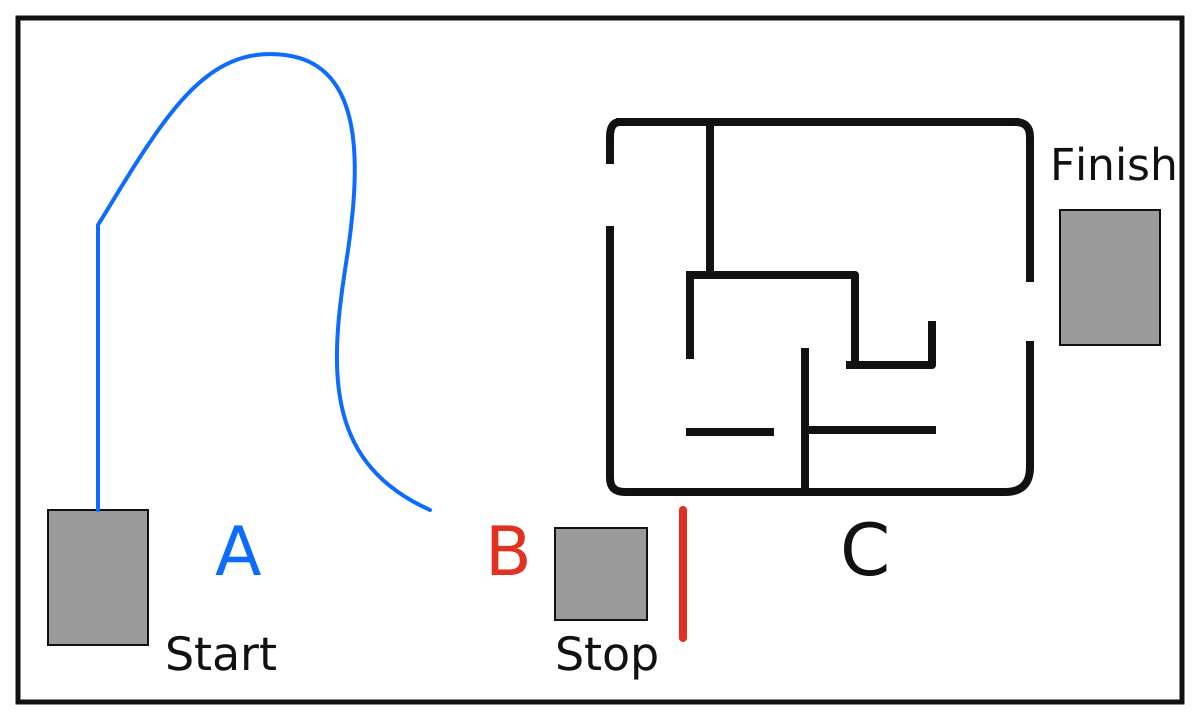
Course overview: the official course fits inside a 5 m wide by 3 m deep rectangle. A is line following from the lower-left start box, B is ultrasonic obstacle detection and the transition into the stop box, and C is manual control through the maze to the finish.
The obstacle should be detected at about 18 cm. The stop box is 30 cm by 50 cm, with the center of the box 25 cm from the wall. Teams should build sensor-based behavior rather than hard-code the course.
# Robot States
The starter code uses these states:
| State | Purpose |
|---|---|
S1_FOLLOW_LINE | Follow the opening line. |
S2_DETECT_OBSTACLE | Use ultrasonic distance to detect the end-of-line obstacle or gate. |
S3_ENTER_BOX | Leave the line and enter the boxed area. |
S4_MANUAL_MAZE | Navigate toward the finish using manual control. |
S5_FINISH | Stop at the finish. |
You may add helper states if your team needs them, but your robot should still follow the main challenge sequence.
# Activity Levels
Every team will have a reachable activity level.
| Level | Goal | What counts as success |
|---|---|---|
| Level 0 | Board bring-up | Flash MicroPython, run starter code, and explain the state machine. |
| Level 1 | Sensor-to-action | Use one input to control one output, such as a sensor threshold controlling a motor or LED. |
| Level 2 | Navigation challenge | Attempt the official timed course with line following, obstacle detection, box entry, and manual maze navigation. |
Teams can start at Level 0 and move upward as hardware and time allow.
# Software Setup
Recommended beginner path:
- Install Thonny: https://thonny.org/
- Install MicroPython for Raspberry Pi Pico 2 using the version named by the organizers.
- Connect the Pico 2 over USB.
- In Thonny, select MicroPython for Raspberry Pi Pico.
- Save
main.pyto the device and run it.
Command-line VS Code setup for Windows and Mac:
Do not use pip install on the microcontroller. Do not leave the robot connected by USB during an official run.
# Starter Code
Download the starter package:
starter-pico2-hackathon-2026.zip
The starter package includes:
firmware/RPI_PICO2-20240809-v1.24.0-preview.201.g269a0e0e1.uf2- MicroPython firmware for Pico 2main.py- the main state-machine loopstates.py- state names and timing constantssensors.py- Yahboom tracking sensor, ultrasonic distance, and app command readsmotors.py- Yahboom motor helper wrapperTOOLCHAIN.md- setup instructionsKIT_SETUP.md- robot-kit notes for motors, line sensors, ultrasonic distance, and app commands
The starter assumes the Yahboom Pico Robot kit. It uses the Yahboom pico_car.py helper library, GPIO 2-5 for the four line sensors, ultrasonic().Distance_accurate() for distance, and the YahboomRobot Bluetooth app for the manual maze phase.
Yahboom kit documentation:
Your first task is to get the robot running the starter code, print/check sensor values, then tune thresholds and speeds for the practice course.
# Rules Summary
- The robot must use line tracking for the opening segment.
- The robot must use ultrasonic distance sensing to detect the obstacle/gate and enter the box.
- The maze segment uses manual control through the robot control app or IR remote.
- Teams using the robot control app instead of the IR remote for the manual maze receive a 5-second penalty.
- Teams may tune thresholds, speeds, and state logic.
- Teams may not hard-code a time-only solution for the Friday course.
- Judges may ask teams to explain which sensor event triggers each state transition.
- Winner is fastest adjusted time: raw time plus penalties.
# Penalties And Recovery
The goal is for every team to reach the maze and finish experience. Most course errors add time penalties rather than ending the run, but teams may not touch the robot during a timed run.
| Event | Penalty | Recovery |
|---|---|---|
| Leaves the line | +5 s | Referee restarts the robot at the point where it left the line |
| Does not enter the box within 10 s after the end of the line | +5 s | Referee places/restarts the robot in the stop box for the manual stage |
| Does not stop in the box | +5 s | Referee restarts the robot for the manual stage |
| Wall touch in maze | +2 s each | Continue |
| Drives through or over a maze wall | +5 s | Referee restarts the robot from the appropriate maze position |
| Team touches the robot during a run | Disqualified run | Run does not count |
Official format:
- Two timed trials per team.
- Optional final run for top teams if time allows.
- Best adjusted time counts.
- App-control penalty: add 5 seconds if the team uses the robot control app instead of the IR remote for the manual maze.
# Getting Help
If setup fails, ask for help at the organizer's station during the prep workshop.
Common issues:
- Pico 2 does not appear: try a different USB cable; some cables are power-only.
- Thonny cannot connect: check interpreter and COM port.
- Motors behave backward: swap direction mapping in
motors.py. - Sensor values look noisy: print raw values first, then tune the threshold.
Organizer: Joel Trudeau, jtrudeau@dawsoncollege.qc.ca